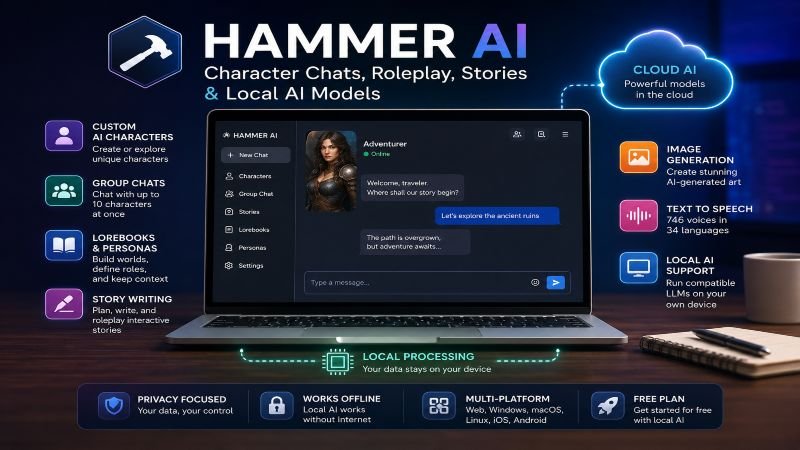
Hammer AI is an AI platform designed for character conversations, roleplay, interactive storytelling, and creative AI experiences. Its key differentiator is the ability to use compatible AI models locally on your own computer, alongside cloud-hosted models. HammerAI also offers a range of customization and creative features, including custom characters, group chats, lorebooks, personas, image generation, and text-to-speech.
The platform offers a free plan, while paid subscriptions currently start at $9 per month. Higher-tier plans provide access to more cloud AI models, larger context windows, additional image and voice credits, and other premium features.
For users looking for a general-purpose AI assistant, HammerAI may not be the most obvious choice. However, for AI roleplay, interactive storytelling, customizable AI characters, and local AI models, it offers a distinctive approach that is worth exploring.
This guide explains what Hammer AI is, how it works, its key features, supported AI models, pricing, privacy considerations, and overall strengths and limitations. Keep reading to find out whether HammerAI is the right AI platform for your needs.
What Is Hammer AI?
HammerAI is an AI chat and creative platform built around large language models (LLMs) and image-generation models. Its official documentation describes the service as being designed for immersive roleplaying, interactive stories, and image generation.
Unlike a conventional chatbot that depends entirely on a company’s cloud infrastructure, HammerAI supports local model execution. Its desktop application can use Ollama to run compatible LLMs on a user’s computer. The web version can also support local inference through WebLLM with compatible hardware and browsers.
That gives users two broad options:
- Cloud AI: use HammerAI’s servers without needing a powerful computer.
- Local AI: run supported models on your own hardware.
HammerAI is available through the web, desktop applications, and mobile apps. The company says the desktop application supports Windows, macOS, and Linux, while its FAQ lists iOS and Android apps.
How Does Hammer AI Work?
HammerAI works differently depending on whether you choose a cloud or local model.
With cloud models, your messages are sent to HammerAI’s servers for processing. HammerAI says these messages are not stored or used to train its models.
With local models, the AI runs on your own device. HammerAI says local conversations can work without an internet connection and remain on the device. This can make local AI attractive to users who place a high value on privacy or offline access.
The basic workflow is simple:
- Choose or create a character.
- Select a suitable AI model.
- Enter a message or prompt.
- Let the model generate a response.
- Continue the conversation or refine the result.
Local AI does require appropriate hardware, particularly for larger models. Performance depends on factors such as available memory, processing power, and the particular model being used.
Hammer AI Features
HammerAI’s feature set is centered on customization and creative interaction.
AI characters
Users can browse existing characters or create their own. Characters can be configured around different personalities, scenarios, and conversational styles.
Group chats
HammerAI supports group conversations involving multiple characters. Its current pricing page says users can chat with up to ten characters at once.
Personas and lorebooks
Personas allow users to define information about themselves or the role they want to play. Lorebooks provide additional world or character information that can be used during conversations and stories.
These features are particularly useful for longer roleplay sessions where maintaining context matters.
Story writing
HammerAI supports dedicated story-writing workflows, making it useful for brainstorming plots, developing characters, creating dialogue, and experimenting with interactive fiction.
Image generation
Paid plans currently include cloud image generation and access to 22 image models, according to HammerAI’s pricing page.
Text-to-speech
Paid plans also include cloud text-to-speech, with HammerAI currently listing 746 voices across 34 languages.
Local AI
Local LLM support is arguably HammerAI’s most distinctive feature. Users can run compatible models through the desktop application instead of sending conversations to a cloud AI provider.
What Can You Use Hammer AI For?
HammerAI is most useful for creative and conversational tasks.
Writers can use it to brainstorm plots, develop characters, test dialogue, and explore fictional scenarios.
Students can use it for brainstorming and creative exercises, although factual information should always be checked against reliable sources.
Content creators can use character and story tools to develop ideas, dialogue, and creative concepts.
Developers can experiment with coding-capable AI models, although HammerAI is not primarily a dedicated coding environment. The company does promote coding-oriented characters and AI use cases.
AI enthusiasts may find the local-model support particularly appealing because it provides an opportunity to experiment with different LLMs on personal hardware.
For important research, legal questions, medical decisions, financial decisions, or other high-stakes tasks, AI output should be independently verified. HammerAI’s own terms warn that generated content can contain inaccuracies.
Which AI Models Does Hammer AI Use?
HammerAI does not depend on one proprietary AI model. Instead, it provides access to multiple cloud models and supports compatible local models.
The exact selection can change over time, so it is better not to treat any individual list of model names as permanent. HammerAI’s local-model system is built around Ollama, and its documentation describes support for downloading and running compatible models.
The current pricing tiers provide different levels of cloud-model access:
| Plan | Cloud LLMs | Maximum context |
|---|---|---|
| Free | 2 | 8,192 tokens |
| Starter | 4 | 16,384 tokens |
| Advanced | 7 | 32,768 tokens |
| Ultimate | 14 | 65,536 tokens |
These figures are based on HammerAI’s current plan descriptions and may change as the service develops.
Hammer AI Pricing: Is It Free?
Yes. HammerAI has a free plan, including access to local LLMs and limited cloud-model access.
Current advertised plans are:
| Plan | Price | Cloud messages | Cloud LLMs | Monthly credits |
|---|---|---|---|---|
| Free | $0 | 600/day | 2 | 0 |
| Starter | $9/month | Unlimited | 4 | 1,500 |
| Advanced | $18/month | Unlimited | 7 | 3,500 |
| Ultimate | $35/month | Unlimited | 14 | 9,000 |
Paid plans include cloud image generation, text-to-speech, automatic conversation memory, and larger context windows.
HammerAI also sells one-time credit packs. Purchased credits do not expire, while subscription credits expire at the end of the billing period.
For someone who mainly wants local AI, the free tier is potentially enough. Paid plans make more sense for users who want greater access to cloud models and premium image or voice features.
Is Hammer AI Safe?
HammerAI’s privacy model depends on how you use it.
When you run a local model, HammerAI says the conversation stays on your device and can work without an internet connection.
When you use a cloud model, your messages are processed on HammerAI’s servers. The company says those messages are not stored or used for model training.
That distinction is important. Users who want the strongest level of on-device privacy should use the desktop application with local models.
Safety also involves accuracy. Running a model locally does not make its answers automatically correct. Like other generative AI systems, HammerAI can produce incorrect or misleading information, so important claims should be independently checked.
Hammer AI Review: Pros and Cons
Pros
- Local AI support: Users can run compatible LLMs on their own hardware.
- Free entry point: Local AI and basic cloud access are available without a subscription.
- Strong character features: Characters, personas, lorebooks, and group chats support detailed roleplay.
- Creative tools: Storytelling, image generation, and text-to-speech extend beyond basic chat.
- Model choice: Users are not restricted to a single AI model.
Cons
- Hardware requirements: Local models can require substantial computing resources.
- Model quality varies: Results depend heavily on the selected model.
- Premium features use credits: Frequent image and TTS users may need additional credits.
- Not primarily a research tool: Users looking for web research, citations, or advanced productivity features may prefer another AI service.
- AI accuracy remains imperfect: HammerAI does not eliminate hallucinations or other generative-AI limitations.
Overall, HammerAI’s strongest case is not that it is a universal AI replacement. Its appeal is the combination of character-focused AI, creative tools, multiple models, and local inference.
Hammer AI vs ChatGPT
HammerAI and ChatGPT serve overlapping but different purposes.
| Category | HammerAI | ChatGPT |
|---|---|---|
| Main focus | Characters, roleplay, stories | General-purpose AI |
| Local LLMs | Yes | Not the standard ChatGPT experience |
| Character customization | Strong focus | Available, but not the core focus |
| Storytelling | Strong focus | Supported |
| Image generation | Yes | Yes |
| Web research | Not a primary focus | Yes |
| File analysis | Not a central focus | Yes |
| Best suited for | Roleplay and local AI | Research, productivity, writing and coding |
ChatGPT is generally the broader choice for users who need web research, file analysis, coding, writing, and general productivity. HammerAI is more compelling for users who specifically want AI characters, roleplay, interactive storytelling, or local models.
Neither is universally “better.” The right choice depends on the job.
How to Use Hammer AI
Getting started is straightforward:
- Visit HammerAI or install the appropriate application.
- Choose an existing character or create one.
- Select a local or cloud model.
- Enter a clear prompt.
- Continue the conversation with follow-up instructions.
- Use personas, lorebooks, stories, images, or group chats when useful.
- Verify important factual information independently.
HammerAI says an account is optional for local AI. An account provides access to cloud models, synchronization, subscriptions, and paid features.
Who Should Use Hammer AI?
HammerAI is a good candidate for:
- Writers and storytellers
- Roleplay enthusiasts
- Character creators
- AI hobbyists
- Users interested in local LLMs
- People who want an offline AI option
- Creators experimenting with AI-generated images and voices
A different platform may be preferable if your main requirement is current web research, citation-heavy research, advanced document analysis, or a broad productivity assistant.
Final Verdict
Hammer AI is worth trying if your main interests are AI characters, roleplay, storytelling, creative experimentation, or local AI.
Its most important differentiator is the ability to combine a character-focused experience with local LLMs. That gives users an alternative to cloud-only AI and can provide greater control over where conversations are processed.
The free tier makes it relatively easy to test before paying. The $9, $18, and $35 subscriptions primarily add broader cloud-model access, larger context windows, automatic memory, image generation, text-to-speech, and more credits.
If you need an all-purpose AI assistant for research, documents, coding, and productivity, HammerAI may not be the best fit. But if local AI and customizable character experiences are what you’re looking for, HammerAI has a distinctive proposition.
Because features, models, and pricing can change, check the official HammerAI documentation and pricing page before making a purchasing decision.
Frequently Asked Questions
What is Hammer AI?
HammerAI is an AI platform focused on character chat, roleplay, interactive stories, image generation, and customizable AI experiences. It also supports local LLMs through its desktop application.
Is Hammer AI free?
Yes. HammerAI offers a free plan with local LLM access and limited cloud-model access.
How much does Hammer AI cost?
Paid plans currently cost $9, $18, or $35 per month, depending on the tier.
Is Hammer AI safe?
HammerAI says local conversations can remain entirely on the user’s device. Cloud conversations are processed on its servers and, according to the company, are not stored or used for training.
What AI models does Hammer AI use?
HammerAI supports multiple cloud LLMs and compatible local models rather than relying on one model. The available selection can change over time.
Is Hammer AI good for writing?
Yes. Its character, story, persona, and lorebook features make it particularly useful for creative writing, brainstorming, dialogue, and interactive fiction.
How does Hammer AI compare with ChatGPT?
HammerAI is more focused on characters, roleplay, storytelling, and local AI, while ChatGPT is designed as a broader general-purpose AI assistant.

Pingback: What Is Flint AI? Complete Guide to Flint AI in 2026